Friday, July 23, 2010


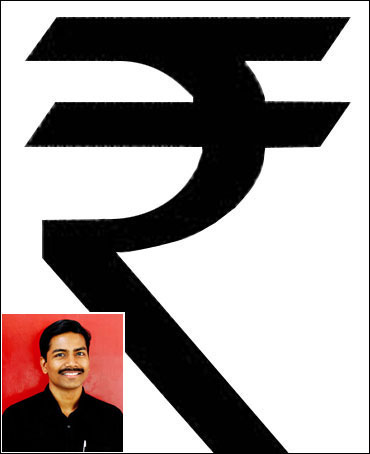
It is time to congratulate D Udaya Kumar, the IIT-ian who won the privilege of giving a symbol for the Indian currency. The symbol set to give the rupee a unique identity, highlights the strength of the growing Indian economy, according to Udaya.

Five designs were shortlisted from over 25,000 applications received from across the country. On July 15, one of the five got the Cabinet's approval. Here's what the other finalists had to say about the Udaya Kumar's symbol.

"Udaya Kumar's design was among the best three designs. The 3-D presentation at the RBI was quite impressive. I am happy that his design has been selected to represent the rupee," says Shibin KK, whose design was among the five shortlisted by the government.

Agrees Shahrukh Irani, whose design was also shortlisted, "Udaya's design was good and it conforms to all the parameters of the contest. All the designs are actually different variations with the strokes."

"I congratulated Udaya and I believe he deserved it for a nice design," Hitesh Padmashali, one of the other finalists, said.

All the finalists made sure the design reflected Indian-ness and at the same time had an international appeal.

"I am happy that I could become a part of the contest, it is like being a part of history," Shahrukh said.

This time we r proud to show the symbol of rupee in sensex


It is time to congratulate D Udaya Kumar, the IIT-ian who won the privilege of giving a symbol for the Indian currency. The symbol set to give the rupee a unique identity, highlights the strength of the growing Indian economy, according to Udaya.

Five designs were shortlisted from over 25,000 applications received from across the country. On July 15, one of the five got the Cabinet's approval. Here's what the other finalists had to say about the Udaya Kumar's symbol.

"Udaya Kumar's design was among the best three designs. The 3-D presentation at the RBI was quite impressive. I am happy that his design has been selected to represent the rupee," says Shibin KK, whose design was among the five shortlisted by the government.

Agrees Shahrukh Irani, whose design was also shortlisted, "Udaya's design was good and it conforms to all the parameters of the contest. All the designs are actually different variations with the strokes."

"I congratulated Udaya and I believe he deserved it for a nice design," Hitesh Padmashali, one of the other finalists, said.

All the finalists made sure the design reflected Indian-ness and at the same time had an international appeal.

"I am happy that I could become a part of the contest, it is like being a part of history," Shahrukh said.
Wednesday, July 21, 2010

Hide files in a jpg

How to:
Hide files in a jpg

Set up:
1. Must have a .zip or .rar compressor.
2. Willingness to learn.

Steps:
1. Save the picture of choice to your desktop.
2. Make a new .rar or .zip folder on your desktop.
3. Add the files you want to hide into the .zip or .rar
4. Click start menu, run, cmd.
5. In Command Prompt type cd “desktop” with the quotation marks.
6. Now type in copy /b picturename.jpg + foldername.rar outputfilename.jpg
( If you use .zip then: copy /b picturename.jpg + foldername.zip outputfilename.jpg)
7. Now there should be the outputed file name with a .jpg extension on the desktop.
( Do not close Command Prompt just yet )
8. Double click it to open the picture and check it out.
9. When your done looking, and want to view the hidden files
Type: ren outputfilename.jpg outputfilename.rar or zip
Now you’re done!
A quick info-fact:
With this technique of hiding files in a jpg you can send this to anyone and they just have to rename the file extension to .zip or .rar.
With this technique the Al-Qaeda operatives were able to send info to others secretively